Posts

Showing posts with the label google

Google for Education Best Practices Resources and Tips

Image
Google Apps for Education and Chromebooks  are very popular with education for many reasons, one of which is the ease of management and deployment. The Admin Console allows staff to manage apps, user settings, devices settings and much more. Here are some tips and best practices for settings in the Admin Console. The Admin Console is relatively easy to use, although some settings can be hard to find. Remember to use the help features by clicking on the question marks throughout the console. The icons on the console can be moved and arranged via drag-and-drop so you can put the ones you use most up front. Typically, Users, Device Management, and Apps are the most used.  Here are some excellent resources: Resources for IT Teams (G Suite for Education) - Learn more about G Suite for Education and Chromebooks, review best practices for deploying the tools smoothly, and access support when you need it. Transition Guides - help prepare your organization for the switch to G Suite. ...

Google I/O 2018 - big announcements from the opening keynote - very cool stuff!

Image
Google kicked off Google I/O 2018 , their developer conference, yesterday, 5/8/18, with a keynote that had some amazing announcements in it.  Here is a summary of them with links to more info on each one. I'm pretty excited for these. Many will be great for education, including news, accessibility and more. ( Google for Education Resources) Google AI is the big topic of the day. AI is being implemented in pretty much everything Google does and there are some really amazing things being accomplished.  https://ai.google/ AI - solving problems for users https://www.blog.google/topics/innovation-technology/io18-overview/ opening AI centers around the world transforming Healthcare https://ai.googleblog.com/2018/05/deep-learning-for-electronic-health.html diagnosing diabetic retinopathy and use eye scan to predict cardiovascular risk helping doctors predict medical events and issues before they happen Accessibility hearing impaired - separating out the noise ways to help people with...

New Training Courses from Google - DigCit and Accessibility

Image
Google has some great resources for educators at the Google for Education Training Center . Included are courses on Chromebooks, becoming a Trainer, and Fundamentals and Advanced training for using G Suite in the classroom. They recently added two new courses that are very relevant to educators. Like the other courses, they are easy to use and excellent materials. The Digital Citizenship and Safety Course helps teachers learn how to help their students stay safe online and become responsible digital citizens. The Tools for Diverse Learners Training helps teachers learn how to use the accessibility features in Chromebooks and G Suite to help their students succeed. Take a look at these two new courses, as well as the rest of the training center, and see how they can help you help your students. Related: Google for Education Resources 

Virtual Reality Apps for Education

Image
Virtual Reality (VR) is one of the newer technologies moving into the classroom. Google Cardboard and Google Expeditions are the two most popular, but here are some more great VR apps for education: (these are links to the Google Play store, but they all have iOS versions also) Cardboard (free) Cardboard puts virtual reality on your smartphone. The Cardboard app helps you launch your favorite VR experiences, discover new apps, and set up a viewer. Try out a set of included demos as well • Earth: Fly where your fancy takes you on Google Earth. • Tour Guide: Visit Versailles with a local guide. • My Videos: Watch your videos on a massive screen. • Exhibit: Examine cultural artifacts from every angle. • Photo Sphere: Look around the photo spheres you've captured. • Arctic Journey: Fly alongside Arctic terns, create your own flower garden, relax under the northern lights and more. Expeditions (free) Google Expeditions is a virtual reality teaching tool that lets you lead or join immers...

Welcome Back to School - Great Resources for Teachers

Image
Welcome back to school! I hope everyone had a great summer and was able to relax and recharge. Most schools around here start next week, with new teachers starting this week. The beginning of the year is always a little crazy for all teachers. Getting your room setup, implementing new ideas into your lesson plans, getting to know your students, and just settling back in to the routine can be busy and stressful. Remember to not over do it and take time for yourself. One thing I've done in the past that helped me is using a check list of everything I have to do when school starts, including setting up my room (computer, bulletin boards, etc), things I want to post in my room, lesson ideas and more in Evernote. I modify it each year, adding new things for the following year. Here are some more tips, resources, and help to get your school year started on a positive note, and keep it that way. Advice to New College Graduates about to enter the Teaching profession Summary of new teacher ...

Some Excellent Resources for Google for Education for Teachers and Admins

Image
Google for Education , which includes G Suite for Education , Chromebooks , and content, is one of the most popular, and most updated, platforms for education. Here are some great resources for IT, Teachers, Students and more. Google for Education main site:  https://www.google.com/edu/   Getting started with G Suite for Education:  https://support.google.com/a/answer/2856827 G Suite for Education:  https://www.google.com/edu/products/productivity-tools/   Chromebooks:  https://www.google.com/edu/products/devices/   Google Device Showcase - Chromebooks, Chromeboxes and more  Google for Education Transformation Center - resources, examples and tips for transforming your classroom and school Class Content:  https://www.google.com/edu/products/class-content/  - content and apps that have been approved by Google Benefits of Google Apps and Chromebooks - lots of resources, tips and ideas Google Apps Administrator Help Site  - for G Su...

Education on Air: It Takes a Teacher - free, online conference from Google 12-3-16

Image
You’re invited to Education on Air, an online conference from Google . Learn with educators from around the world. Join Google for Education on Saturday, December 3rd for Education on Air, a free online conference. Learn from over 100 sessions led by other educators. Learn new approaches & celebrate around that #ItTakesATeacher: Australia & New Zealand sessions: 10am AEST  United Kingdom sessions: 10am GMT  Americas sessions: 12pm ET / 9am PT  Register here Register (it's free) and you’ll have the opportunity to: Engage with other educators and school leaders to share with and learn from each other  Hear from inspiring speakers like Linda Darling-Hammond, Jennie Magiera, Kevin Brookhouser and many more  Explore the latest Google product news and get tips and tools from educators  In the meantime, check out our It Takes a Teacher page where you can share your stories with the hashtag #ItTakesATeacher. In the coming weeks I'll post updates on t...

Google announces a lot of updates and changes, including a new name for things

Image
Yesterday afternoon Google announced a ton of updates and one big new thing - a new name for Google Apps. It is now "G Suite". They also changed the name for all of their services to Google Cloud. It is a name change to better align with all of their offerings and products and the services and apps are still the same. Different name, same great products. The name change has already gone out in the Admin help page, Google+ community and more. For Google for Education , there are now 4 areas - G Suite for Education (Docs, Sheets, Slides, Forms, Sites, Gmail, Calendar, Drive), Classroom, Chromebooks, and Content (Creative Apps). There were also some announcements with product and feature updates: Introducing Google Cloud  - Today we’re announcing Google Cloud, Google’s unique and broad portfolio of products, technologies and services that let our customers operate in a digital world easily and at peak performance. All together now. Introducing G Suite.  G Suite is a set of ...

Ex Google Play Marketing Chief Hired to Help Students Enter "Workplace of the Future"

Image
Consider this: Bill Gates has poured billions of dollars into what he calls the “future of learning” - and Mark Zuckerberg just announced a new $50M ed-tech investment. Both with a big push towards personalized learning. Course Hero, now led by a new CMO - former Google Play Marketing chief, Patrick Mork - wants to also bet on students, by democratizing access to study materials: its 12.5M users, to be exact. By tackling the “The 4 Ls” - crucial problems that students and educators face today - this college student favorite wants to change the way students learn, study, and succeed in the “workplace of the future”. What are the 4 L’s? It’s lack of: #1 TIME: Students today have less time than ever before to master their course material because of more classwork, homework, multiple study groups, extra-curricular activities, and even side jobs to pay their ballooning student bills. #2 MASTERY: Students learn the same material at the same pace but are often not mastering the full conten...

Welcome Back to School - tips, resources and more to help you get off to a great start.

Image
Welcome back to school! I hope everyone had a great summer and was able to relax and recharge. Most schools around here start next week, with new teachers starting this week. The beginning of the year is always a little crazy for all teachers. Getting your room setup, implementing new ideas into your lesson plans, getting to know your students, and just settling back in to the routine can be busy and stressful. Remember to not over do it and take time for yourself. One thing I've done in the past that helped me is using a check list of everything I have to do when school starts, including setting up my room (computer, bulletin boards, etc), things I want to post in my room, lesson ideas and more in Evernote. I modify it each year, adding new things for the following year. Here are some more tips, resources, and help to get your school year started on a positive note, and keep it that way. Advice to New College Graduates about to enter the Teaching profession Summary of new teacher ...

Lots of great new things coming to Google Apps and Chromebooks!!!

Image
Google Apps for Education and Chromebooks have become truly awesome resources for schools and Google just keeps improving them. Here are some of the recent announcements: Android apps are coming to Chromebooks! - some Android apps have already been available for use on a Chromebook. I've been using the Evernote app for a while and love it. But in order to get them to work, developers had to do some work themselves. With this new announcement, the Google Play Store and most of it's app will work with Chromebooks. Three models are getting access in June with more getting access later. See this link for full details on which Chromebooks will get this and when. This is huge for schools as they will be able to benefit from the low cost and ease of use and management of Chromebooks, and use all of the great Android apps that are out there. With this announcement, touchscreen Chromebooks are even more functional for schools. For specs, 4GB RAM is always my suggestion and 16GB driv...

Two infographics with tips for becoming a Power Google User!

Image
Google is an excellent research and search tool, but there are some tips and features that a lot of people don't know about. These two inforgraphics have some great tips and information on getting more out of Google. (click on image to view larger, or download and view)  HackCollege.com  ----------------------------------

Assistive Technology and Accessibility Resources

Image
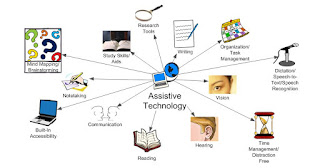
One of the things I do in my role as a K-12 Education Strategist is work on resources for schools to use. I've been working on a resource document that has resoures on Assistive Technology and Accessibility and thought I would share it here: Related: More Accessibility Resources Google Accessibility Features and Resources -

Benefits of Google Apps and Chromebooks for Schools

Image
Benefits of Google Apps and Chromebooks Updated version of this as a Google Doc: https://goo.gl/zbcAA2   How does Google Apps and Chromebooks compare to Apple or Microsoft inside the classroom? Google Apps and Chromebooks are extremely easy to use. Students and teachers can access thousands of web apps and extensions, most free, as well as everything on the internet.   Schools using Chromebooks have great experiences with limited issues or concerns. Unlimited file storage on Google Drive (any type of file) plenty of resources to help teachers use them to improve teaching and learning can use Office Editing (free app) in Docs, Sheets and Slides to edit Word, Excel and PowerPoint files can use Office 365 or any web based software can be used as the only device, or in a mixed device environment huge community of users that share and support each other (over 50 Millions users of GAFE!!) Google Classroom i s a game-changer…it allows teachers to share resources and communicate wit...